A screenshot crashed a 3-hour AI session. But it wasn’t the screenshot’s fault.

The chain
Here’s what happened, in order:
1. Chrome DevTools lies about dimensions. The browser’s screenshot API reports viewport pixels — the logical size you see on screen. On a Retina display, the actual PNG contains 2× the pixels. A “1393×1278” screenshot is really 2786×2556.
2. The resize function trusted the lie. Our screenshot optimizer checked the reported dimensions against a 1568px limit. 1393 < 1568. No resize needed. But the actual image was 2786px wide — well over the 2000px API limit for conversations with many images.
3. The agent fixed the bug mid-session. The AI agent editing our codebase found the issue, wrote the fix, committed it. The file on disk was updated. Problem solved — except it wasn’t.
4. The runtime doesn’t hot-reload. The extension system loads code once at session start. Editing the file during a session changes what’s on disk but not what’s running in memory. The old, broken code continued executing. The agent had fixed a bug it couldn’t benefit from.
5. Images accumulated silently. Over three hours, 37 screenshots piled up in the conversation — 10MB of image data. Each one was fine individually. Collectively, they triggered a stricter API limit.
The 37th screenshot — the 2786px Retina image that should have been resized but wasn’t — pushed the conversation over the edge.
The API returned a 400 error. The terminal input locked. The keepalive system, designed to prevent cache eviction, didn’t recognize 400 as a “stop retrying” signal (it only knew about 429 rate limits). So it retried. Got another 400. Retried again. The session was permanently dead.
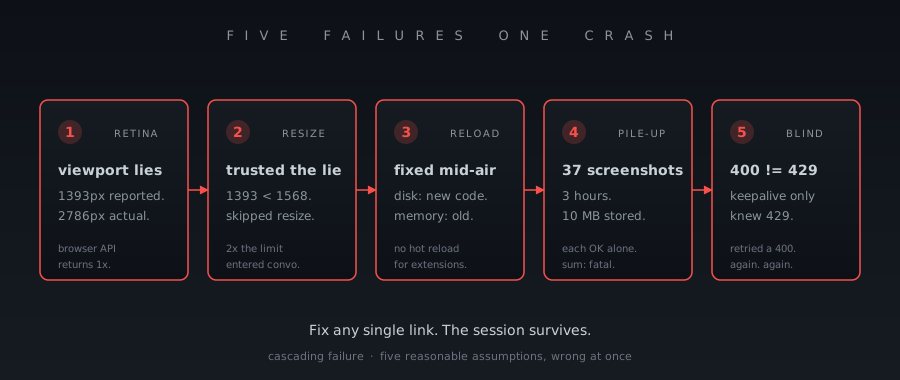
Five failures, one crash
Remove any single link from the chain and the session survives:
| If this hadn’t happened | The session would have… |
|---|---|
| No Retina display | Images stay under 2000px |
| Read actual PNG dimensions | Resize catches the 2x |
| Hot-reload extensions | Fix takes effect immediately |
| Strip old images after 15 | Payload stays small |
| Pause keepalive on 400 | Session recovers gracefully |
This is what cascading failure looks like in practice. Not one catastrophic bug — five reasonable assumptions that happened to be wrong at the same time.
The fixes are layered too
We didn’t fix one thing. We fixed five, at different layers:
Prevent: Read actual pixel dimensions from the PNG header, not the viewport API. The image tells you exactly how big it is in the first 24 bytes.
Contain: When more than 15 images accumulate in a conversation, strip the oldest ones automatically. Replace them with [image removed] text placeholders. Keep the last 8 so the agent can still reference recent screenshots.
Recover: Pause the keepalive system on 400 errors, not just 429s. A 400 means the payload is permanently invalid — retrying won’t help. Stop making it worse.
Escape valve: A new tool — soma session strip-images — lets you manually strip all images from a session file and resume with soma -c. The nuclear option when nothing else works.
Awareness: The agent now reports actual pixel dimensions in the screenshot output, not viewport dimensions. When you see “1568×1142 jpeg (142KB)” you know that’s the real size, not a lie from the viewport API.
The boundary
The most interesting failure in the chain is #4 — the agent fixed the code but couldn’t reload it. This isn’t a bug we can fix. It’s a boundary.
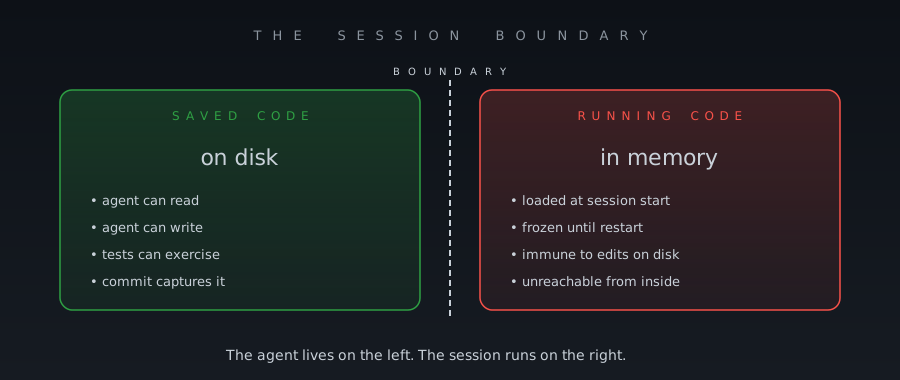
The extension runtime loads code once. That’s a security and stability feature — you don’t want running code to change underneath you mid-session. But it means an agent that modifies its own tools lives in a paradox: it can write the fix but can’t apply it.
Recognizing this boundary changed how we think about self-modifying agents. The fix isn’t “add hot-reload.” The fix is: build systems that degrade gracefully when the running code doesn’t match the saved code. Detect the drift. Notify the user. Suggest a restart. Don’t pretend it didn’t happen.
Robust systems aren’t the ones where nothing goes wrong. They’re the ones where five things go wrong and the user barely notices.
What the numbers said
After the crash, we analyzed the session file:
Total images: 37
Total image payload: 10.1MB
File size: 15.9MB (images were 63% of the session)
Oversized images: 1 (2786×2556, the Retina one)
After stripping: 15.9MB → 2.6MB. The session resumed cleanly.
37 images over 3 hours is about one every 5 minutes. That’s not unusual for an agent working on a UI — it takes screenshots to verify its changes. The system needs to handle this as a normal workload, not an edge case.
Every screenshot is a promise: “I’ll remember what this looked like.” 37 promises, 10 megabytes of proof. When the proof gets too heavy, you have to let some of it go. The trick is choosing which ones to keep.
Read next: How Much Does a Screenshot Cost? — the cache-economics angle of the same bug. And Tests That Bailed Silently — another silent failure mode that hid in plain sight.